

WP Discord Invite
By Sarvesh M Rao
Create memorable Discord invite links (yoursite.com/discord) with tracking, webhooks, and social previews.
★ 4.6/5 (7)400+ active installations
- Version
- 2.6.0
- WordPress
- 5.2+
- PHP
- 7.2+
- Updated
- 14 Feb 2026
WORDPRESS RESOURCES
Explore public plugin information from the official WordPress.org directory. Compare what a plugin does, its requirements and update history before adding it to your website.
Explore WordPress hosting →788 matching plugins reported by WordPress.org · Page 30 of 50
Source: WordPress.org
Data refreshed 21 Nov 2026 15:37 UTC
By Sarvesh M Rao
Create memorable Discord invite links (yoursite.com/discord) with tracking, webhooks, and social previews.

By laruence
Yac (lock-free shared memory) backed object cache for WordPress. Zero external servers, zero network round trips.

By Marian Balev
A powerful WooCommerce extension that sends order updates directly to your Discord server.
AI chatbot for WooCommerce that answers product and policy questions, finds products in plain language, and recommends what to buy.

By ThemeAtelier
Add a Facebook Messenger chat button to WordPress — floating chat bubble, pre-filled messages, availability hours, and built-in analytics.

By Steve Truman
Places an icon, all time views count and views today count at the bottom of posts, pages and custom post types on any WordPress website.

By J-C Berthon
Stop spam without CAPTCHAs. Proof-of-Work protection for your forms and logins. Open-source, self-hosted, privacy-first.

By agehman
Display a banner at the top or bottom of your WordPress site.
By Ron Fredericks
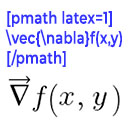
Render mathematical equations in WordPress as PNG images using pmath native syntax or LaTeX input with server-side rendering.

By nickforddesign
An add-on for Advanced Custom Fields to allow users to select from a list of color choices. Setting up the field works exactly like setting up a radio …

By Clifton Griffin
Create content templates for your posts and pages. When creating a new post or page use one of your content templates as the starting point!
Create custom cursors, animated cursor effects, and animated background effects in WordPress with a live preview. No coding required.
CHOOSE WHAT YOUR WEBSITE NEEDS
Start with the task you need to solve. Compare features, WordPress and PHP requirements, update history and the author’s documentation. Test changes on a private copy and avoid adding several plugins for the same job.
This independent directory displays plugin information on WebFulHost and links to the official source. Packages are not mirrored or installed here. A plugin can include paid extensions or services with separate terms from its author.

