Find and delete unused images and media files, fix broken entries, with a trash to undo anything. A lighter, faster WordPress! 💕
★ 4.6/5 (782)90,000+ active installations
- Version
- 7.3.8
- WordPress
- 6.0+
- PHP
- 8.1+
- Updated
- 22 Nov 2026
WORDPRESS RESOURCES
Explore public plugin information from the official WordPress.org directory. Compare what a plugin does, its requirements and update history before adding it to your website.
Explore WordPress hosting →816 matching plugins reported by WordPress.org · Page 33 of 50
Source: WordPress.org
Data refreshed 28 Nov 2026 18:40 UTC
Find and delete unused images and media files, fix broken entries, with a trash to undo anything. A lighter, faster WordPress! 💕

By nikolaychernuha
Turn a product photo into a looping video of your clothes on a model, in every size your shop sells.

By Enterrahost
Easily clone or clone & edit WooCommerce products or WordPress posts with one click.

By artplacer
Allow your visitors visualize how artworks look on walls as soon as they land on your website!

By mariosmode
Publish content from a staging site to a live site one item at a time - with its media, taxonomies and references intact. No whole-database migration.
Replaces the default WooCommerce single-product gallery with a Swiper slider — arrows, dots, and an optional synced thumbnail navigation.
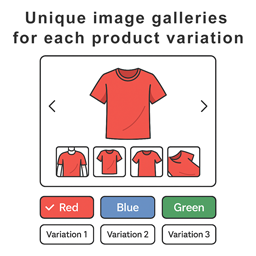
Short Description: Give each WooCommerce product variation its own gallery to improve your store’s visuals and shopping experience.
HT Politic is a Political WordPress Plugin.

By Codestorm Technology
Create accessible flipbooks from PDFs or up to 10 Media Library images, entirely on your WordPress site.

By grafiduo
Publish WooCommerce products as offers on the InPost Von Halsky marketplace, sync prices and stock, and import marketplace orders into your shop.

By HasThemes
Preview Link Generator is a plugin to help you create demo/preview links for your WordPress themes, plugins, HTML templates preview.
Import affiliate products, compare prices, and publish product reviews with 25+ editorial Gutenberg blocks.
CHOOSE WHAT YOUR WEBSITE NEEDS
Start with the task you need to solve. Compare features, WordPress and PHP requirements, update history and the author’s documentation. Test changes on a private copy and avoid adding several plugins for the same job.
This independent directory displays plugin information on WebFulHost and links to the official source. Packages are not mirrored or installed here. A plugin can include paid extensions or services with separate terms from its author.