

48 WooCommerce modules in one plugin: product labels, quick view, buy now, pre-orders, variation swatches, discount rules & more.
★ 4.2/5 (11)8,000+ active installations
- Version
- 2.3.3
- WordPress
- 6.4+
- PHP
- 7.4+
- Updated
- 19 Nov 2026
WORDPRESS RESOURCES
Explore public plugin information from the official WordPress.org directory. Compare what a plugin does, its requirements and update history before adding it to your website.
Explore WordPress hosting →4,887 matching plugins reported by WordPress.org · Page 33 of 50
Source: WordPress.org
Data refreshed 21 Nov 2026 07:12 UTC
48 WooCommerce modules in one plugin: product labels, quick view, buy now, pre-orders, variation swatches, discount rules & more.

By hcaptcha
The strongest CAPTCHA. Switch from reCAPTCHA and Turnstile for free. Works with 60+ integrations: Contact Form 7, Elementor, WooCommerce, Divi, etc.

By CoSchedule
Headline Studio WordPress plugin allows you to easily analyze & improve your headlines as you create content in WordPress

Let users upload a custom user avatar and profile picture from their device or webcam, stored on your own server instead of Gravatar.

By Alex
Enterprise-grade WordPress security: WAF, brute force protection, malware scanner, 2FA, honeypots, AI crawler control, and post-breach recovery.
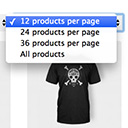
By Jeroen Sormani
Products Per Page for WooCommerce is a easy-to-setup plugin that integrates a 'products per page' dropdown on your WooCommerce pages.

By blazethemes
All-in-one Elementor addons designed specifically for news and magazine websites.

By David Lingren
Enhances the Media Library; powerful gallery and list shortcodes, full taxonomy support, IPTC/EXIF/XMP/PDF processing, bulk/quick edit.

By Trusty Plugins
AJAX filter & WooCommerce product filter. Filter posts, CPTs & products by category, taxonomy, attribute & price. Build with drag & drop or AI (MCP).

By Dhanendran Rajagopal
Instant switching between user roles in WordPress.

By ShapedPlugin LLC
AI-Powered FAQ Generator. Gutenberg FAQ & Accordion Blocks, Image Accordion, Accordion Slider, WooCommerce Product FAQ – Elementor & Shortcode Ready.

By Megiston
Moves admin notices into a bell panel in the admin bar. Nothing stored, nothing lost: success messages and inline notices stay where they are.
CHOOSE WHAT YOUR WEBSITE NEEDS
Start with the task you need to solve. Compare features, WordPress and PHP requirements, update history and the author’s documentation. Test changes on a private copy and avoid adding several plugins for the same job.
This independent directory displays plugin information on WebFulHost and links to the official source. Packages are not mirrored or installed here. A plugin can include paid extensions or services with separate terms from its author.