Seed Fonts
By SeedThemes
Use web fonts (@font-face) by choosing from Google Fonts, Bundled Thai-English fonts, and your own web fonts.
★ 4.6/5 (16)20,000+ active installations
- Version
- 2.4.3
- WordPress
- 4.9+
- PHP
- 7.4+
- Updated
- 20 Nov 2026
WORDPRESS RESOURCES
Explore public plugin information from the official WordPress.org directory. Compare what a plugin does, its requirements and update history before adding it to your website.
Explore WordPress hosting →9,544 matching plugins reported by WordPress.org · Page 38 of 50
Source: WordPress.org
Data refreshed 28 Nov 2026 08:42 UTC
By SeedThemes
Use web fonts (@font-face) by choosing from Google Fonts, Bundled Thai-English fonts, and your own web fonts.

By wpweaver
A useful shortcode and widget collection for Weaver Xtreme

By Marcus (aka @msykes)
Events calendar and booking system: bookings, reservations, appointments, scheduling, event registration, tickets and recurring events.

By Ajay
Keep visitors on your site longer with intelligent, fast-loading, contextually related posts. Block, shortcode, custom post type and widget ready.
Push Notifications for WP - Self Hosted Web Push Notifications makes it easy to send Web Push notifications to your users for FREE with 2 minutes setu …

By WordPress.org
Plugin Check is a WordPress.org tool which provides checks to help plugins meet the directory requirements and follow various best practices.

By seowriting
Create articles for SEO and AI Search, add internal links with semantic search, and auto-publish or schedule posts on WordPress.

By Kybernetik Services
Make up custom-tailored preview lists of the contents easily and place them in widget areas and post contents.

By Gunjan Jaswal
Auto-export WordPress as static HTML to Cloudflare Pages on publish — with SEO meta, JSON-LD schemas, sitemaps, and robots.txt.

By Almhdy
AI automatic translation for Polylang. Translate posts, pages, WooCommerce, ACF, SEO meta & custom fields using OpenAI, DeepL, Google or OpenRouter.

By boldthemes
Bold Timeline Lite – WordPress Timeline Plugin
By PickPlugins
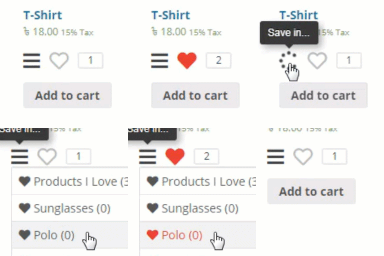
Add wishlist feature to your WooCommerce product or any post types.
CHOOSE WHAT YOUR WEBSITE NEEDS
Start with the task you need to solve. Compare features, WordPress and PHP requirements, update history and the author’s documentation. Test changes on a private copy and avoid adding several plugins for the same job.
This independent directory displays plugin information on WebFulHost and links to the official source. Packages are not mirrored or installed here. A plugin can include paid extensions or services with separate terms from its author.