

Add unlimited RSS feeds, import their items automatically, and show them anywhere on your site with a block or shortcode.
★ 4.5/5 (566)40,000+ active installations
- Version
- 5.8.0
- WordPress
- 6.2.2+
- PHP
- 7.4.0+
- Updated
- 18 Nov 2026
WORDPRESS RESOURCES
Explore public plugin information from the official WordPress.org directory. Compare what a plugin does, its requirements and update history before adding it to your website.
Explore WordPress hosting →2,514 matching plugins reported by WordPress.org · Page 4 of 50
Source: WordPress.org
Data refreshed 25 Nov 2026 13:11 UTC
Add unlimited RSS feeds, import their items automatically, and show them anywhere on your site with a block or shortcode.

By imemine
Simple Page Redirect is an easy-to-use WordPress plugin that lets you quickly redirect any post, page, or custom post type to an internal or external …
Query, filter and display content dynamically - WooCommerce and CPT Grids, ACF Galleries, MetaBox Maps and more.
Organize your pages, posts, and custom post types into folders. Upgrade to pro for media library folders, WooCommerce integration, and more.
Modern Bulk Editor for Events, create and edit events in a spreadsheet inside wp-admin. No need to export/import, all the changes are applied live.
Duplicate post, post order, image resize, email via SMTP, admin menu editor, custom css / code, disable gutenberg and much more in a single plugin.
By Felix W.
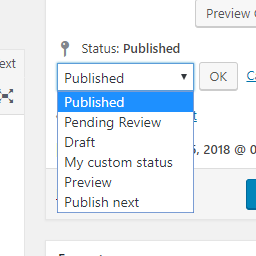
Add new statuses to all post types (posts, pages, products, ...).
Organize thousands of WordPress media files in folders / categories with ease.

By flymke
Mark and highlight posts, pages and posts of custom post types within the posts overview.
WooCommerce Bulk Edit for products, orders, coupons & any WordPress post type – all in one Excel-like spreadsheet. Manage stock & pricing too.

By Unlimited Elements
Bulk edit posts, pages, products, and custom fields using a spreadsheet interface.

By David Anderson / Team Updraft
Protect your WordPress site with All-In-One Security (AIOS): easy-to-use login security, a powerful firewall, and much more.
CHOOSE WHAT YOUR WEBSITE NEEDS
Start with the task you need to solve. Compare features, WordPress and PHP requirements, update history and the author’s documentation. Test changes on a private copy and avoid adding several plugins for the same job.
This independent directory displays plugin information on WebFulHost and links to the official source. Packages are not mirrored or installed here. A plugin can include paid extensions or services with separate terms from its author.





