

Add global shop discount to all WooCommerce products. Beautifully.
★ 5.0/5 (4)600+ active installations
- Version
- 2.3.3
- WordPress
- 4.8+
- Updated
- 23 Nov 2026
WORDPRESS RESOURCES
Explore public plugin information from the official WordPress.org directory. Compare what a plugin does, its requirements and update history before adding it to your website.
Explore WordPress hosting →7,656 matching plugins reported by WordPress.org · Page 42 of 50
Source: WordPress.org
Data refreshed 25 Nov 2026 03:11 UTC
Add global shop discount to all WooCommerce products. Beautifully.

By Zulkaif Riaz
A lightweight plugin to display Coming Soon, Maintenance, or Landing Page screens to visitors while you work on your site.

Paid membership & LMS plugin. Sell courses, subscriptions & digital products, paywall content, and add login & registration forms and user profiles.

By Nks
Send bulk emails to your WordPress users directly from your dashboard — send to all, filter by role, personalise with placeholders.

By Bongdevs
Smooth, accessible scrolling announcement bars and news tickers for your header, footer or any page. Live preview, block and Elementor widget.
Appointment scheduling & event booking plugin for WordPress. Let clients self-schedule 24/7, register for events, and pay at booking.

By Fahad Mahmood
A documents management tool for education portals.

By Kaya Studio
Sends email notifications when selected WordPress users successfully log in, with customizable notification settings.
Embed PDF, Word, Excel & PowerPoint in WordPress. PDF viewer, 3D flipbook and document library with Gutenberg block & Elementor widget.

By WPFactory
WooCommerce coupons by user roles.
A flexible discount system for WooCommerce. Create tiered coupons, conditional promotions, and user-specific discounts with ease.
By WP Darko
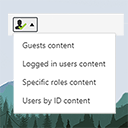
The simplest way of controlling who sees what in your posts/pages. Restrict content to logged in users only (or guests, or by roles) with simple short …
CHOOSE WHAT YOUR WEBSITE NEEDS
Start with the task you need to solve. Compare features, WordPress and PHP requirements, update history and the author’s documentation. Test changes on a private copy and avoid adding several plugins for the same job.
This independent directory displays plugin information on WebFulHost and links to the official source. Packages are not mirrored or installed here. A plugin can include paid extensions or services with separate terms from its author.


