

Integrate Umami
By Ancocodet
Integrate Umami Analytics into your WordPress site.
★ 4.3/5 (3)2,000+ active installations
- Version
- 0.9.0
- WordPress
- 6.0+
- PHP
- 7.4+
- Updated
- 11 Oct 2026
WORDPRESS RESOURCES
Explore public plugin information from the official WordPress.org directory. Compare what a plugin does, its requirements and update history before adding it to your website.
Explore WordPress hosting →4,464 matching plugins reported by WordPress.org · Page 50 of 50
Source: WordPress.org
Data refreshed 21 Nov 2026 23:14 UTC
By Ancocodet
Integrate Umami Analytics into your WordPress site.

By moveaddons
Move Addons is a WordPress plugin for Elementor page builder, is a powerful tool that helps you to make almost every possible customization to your we …
Responsive, lightweight, and fully customizable accordion plugin for WordPress. Perfect for FAQs, content organization, and improving user experience.
A lightweight plugin that automatically minifies, compresses, and caches HTML, CSS, and JavaScript on demand to improve your website’s load speed.

By Mustafa Uysal
Easy way to use Yandex Metrica on your WordPress site.

By Daniel Iser
Create unlimited accessible modal windows and reusable visual themes using content from the WordPress editor.

By Jeroen Sormani
Advanced Free Shipping for WooCommerce is an plugin which allows you to set up advanced free shipping conditions.

By Jordy Meow
Gallery Custom Links allows you to link images to a specified URL. Tested with WordPress Gallery, Gutenberg, the Meow Gallery and others.
GLS Shipping plugin for WooCommerce
Easily import any file of any size into any plugin, post type, custom field, or taxonomy. Supports WooCommerce, ACF, images, galleries, users, real es …

By mra13 / Team Tips and Tricks HQ
Allows you to accept fast and secure payments for products and services via a payment popup window, supporting both the new PayPal and Stripe Checkout …
By Jeroen Sormani
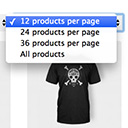
Products Per Page for WooCommerce is a easy-to-setup plugin that integrates a 'products per page' dropdown on your WooCommerce pages.
CHOOSE WHAT YOUR WEBSITE NEEDS
Start with the task you need to solve. Compare features, WordPress and PHP requirements, update history and the author’s documentation. Test changes on a private copy and avoid adding several plugins for the same job.
This independent directory displays plugin information on WebFulHost and links to the official source. Packages are not mirrored or installed here. A plugin can include paid extensions or services with separate terms from its author.



