
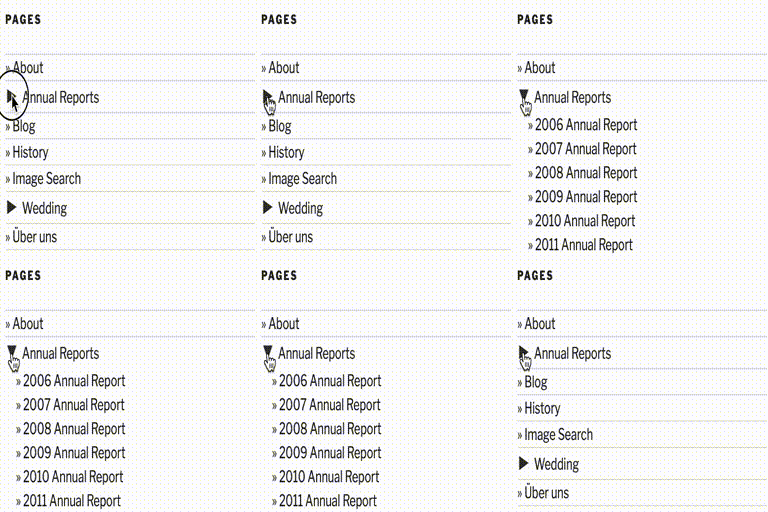
Collapsing Pages
By robfelty
This plugin uses Javascript to dynamically expand or collapsable the set of pages for each parent page.
200+ active installations
- Version
- 2.0.3
- WordPress
- 5.0+
- Updated
- 1 Jan 2024
WORDPRESS RESOURCES
Explore public plugin information from the official WordPress.org directory. Compare what a plugin does, its requirements and update history before adding it to your website.
Explore WordPress hosting →907 matching plugins reported by WordPress.org · Page 50 of 50
Source: WordPress.org
Data refreshed 29 Nov 2026 15:09 UTC
By robfelty
This plugin uses Javascript to dynamically expand or collapsable the set of pages for each parent page.

By powereight
Publish soccer match results on WordPress. Half-by-half scoreboard, extra time, penalty shootouts, lineups and highlights. Requires SPOSCOR Core.

By soradigital
Complete SEO toolkit — meta, 18 schema types, smart redirects, multi-project Indexing API and Search Console stats. Every feature is free.

By rickey29
Render your WordPress pages in Node.js while WordPress and its plugins keep running, with automatic fallback to WordPress.

By CleverSEO
AI-powered SEO audit for WordPress and WooCommerce. Works alongside any SEO plugin, with reasoned fix suggestions and a client-ready PDF report.

All-in-one WordPress CRM: email, SMS and WhatsApp marketing, newsletters, sales pipeline, booking, helpdesk, MCP and automations. A self-hosted CRM.

By Jesse Sugden
WooCommerce monitoring that tells you when your store stops taking orders, renewals or payments, even while the site looks fine.

By Steven
Extension for the Connections Business Directory that adds a shortcode and widget to display a login form.

By BRAJABANDHU MAHANTA
Place AdSense and banner ads anywhere with device, page and schedule targeting. Includes an ads.txt editor and Google Analytics by ID.
Performance-first block library for WordPress. Build pages that load fast, look great, and stay yours.

Blocks for the WordPress block editor and Elementor widgets, thousands of ready-made sections, 95+ full websites with previews, and an AI builder.

By visionforgex
Connect your site to VisionForgeX in one click: your ad tag and ads.txt lines go in place by themselves, and you manage your ads from WordPress.
CHOOSE WHAT YOUR WEBSITE NEEDS
Start with the task you need to solve. Compare features, WordPress and PHP requirements, update history and the author’s documentation. Test changes on a private copy and avoid adding several plugins for the same job.
This independent directory displays plugin information on WebFulHost and links to the official source. Packages are not mirrored or installed here. A plugin can include paid extensions or services with separate terms from its author.
