

Create clients, partners or sponsors responsive Logo Slider, Logo Carousel or Logo Grid. Display unlimited Logo Showcase with shortcode and settings.
★ 4.6/5 (10)5,000+ active installations
- Version
- 3.3.8
- WordPress
- 4.7+
- PHP
- 5.4+
- Updated
- 11 Oct 2026
WORDPRESS RESOURCES
Explore public plugin information from the official WordPress.org directory. Compare what a plugin does, its requirements and update history before adding it to your website.
Explore WordPress hosting →3,780 matching plugins reported by WordPress.org · Page 6 of 50
Source: WordPress.org
Data refreshed 27 Nov 2026 06:52 UTC
Create clients, partners or sponsors responsive Logo Slider, Logo Carousel or Logo Grid. Display unlimited Logo Showcase with shortcode and settings.
By Graham
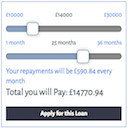
A simple repayment calculator. Uses sliders to set the amount and term and displays a range of outputs

By WEN Themes
Simple responsive logo slider for your WordPress site
Build responsive, accessible sliders or carousel in the Block Editor fast templates, no code needed.
Need a Before After Image Comparison slider? Create your before and after slider with BEAF. Addon for Elementor Before and After Slider is included.
Display WooCommerce products in a responsive slider or carousel with customizable layouts to boost engagement and improve product browsing.

By ShapedPlugin LLC
Widget Post Slider to display post images in a slider from one or more categories.

By jgwhite33
Display Facebook Page reviews, recommendations, and X (Twitter) posts in a fast WordPress slider or grid. Official APIs; stored locally.
Show WooCommerce products in carousels, sliders and grids with hover image swap, quick view and fade effects. Works with Gutenberg and Elementor.

By solverwp
A beautiful, easy to use post slider widget for Elementor to display your recent posts.

By Rustaurius
Add a responsive slider to any page with a block shortcode. Multiple slide effects. WooCommerce slider integration.
A fast, lightweight responsive thumbnail slider for WordPress — modern animation engine, lightbox, captions, and full theme/builder compatibility.
CHOOSE WHAT YOUR WEBSITE NEEDS
Start with the task you need to solve. Compare features, WordPress and PHP requirements, update history and the author’s documentation. Test changes on a private copy and avoid adding several plugins for the same job.
This independent directory displays plugin information on WebFulHost and links to the official source. Packages are not mirrored or installed here. A plugin can include paid extensions or services with separate terms from its author.




