

The friendly way to build real Mapbox, MapLibre, or Google maps in WordPress — store locators, GeoJSON data, custom popups, and more.
★ 4.9/5 (54)3,000+ active installations
- Version
- 2.0.7
- WordPress
- 5.0.0+
- Updated
- 16 Nov 2026
WORDPRESS RESOURCES
Explore public plugin information from the official WordPress.org directory. Compare what a plugin does, its requirements and update history before adding it to your website.
Explore WordPress hosting →1,711 matching plugins reported by WordPress.org · Page 7 of 50
Source: WordPress.org
Data refreshed 21 Nov 2026 13:13 UTC
The friendly way to build real Mapbox, MapLibre, or Google maps in WordPress — store locators, GeoJSON data, custom popups, and more.

Build a searchable WordPress knowledge base, documentation hub, help center, or FAQ with responsive layouts, live search, and analytics.
The ultimate snippet manager for WordPress. Create and manage custom HTML, CSS, or JS code snippets and control where and when they are displayed.

By brightvesseldev
Ultimate Pre-Orders Plugin for WooCommerce.
Free WordPress helpdesk & support ticket system with AI chatbot, AI reply assistant, unlimited tickets and agents, Elementor and Gutenberg blocks.

By Barn2 Plugins
Discover the easy way to add extra tabs to your WooCommerce product pages.

By Majestic Support
Majestic Support for WordPress is a top-tier ticket system that can significantly enhance your customers' support experience.

By WordPress.org
Plugin Check is a WordPress.org tool which provides checks to help plugins meet the directory requirements and follow various best practices.

By Barn2 Plugins
Automatically create searchable and sortable tables of your posts.

By Stephen Harris
Create and maintain events, including complex reoccurring patterns, venue management (with Google Maps or OpenStreetMap), calendars and customisable e …
By Pektsekye
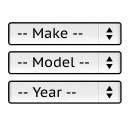
It will find products for selected make and model.

By Gregory K. (@tivnet)
Make your WordPress site multilingual - each language with its own URL, and an easy interface to enter your translations.
CHOOSE WHAT YOUR WEBSITE NEEDS
Start with the task you need to solve. Compare features, WordPress and PHP requirements, update history and the author’s documentation. Test changes on a private copy and avoid adding several plugins for the same job.
This independent directory displays plugin information on WebFulHost and links to the official source. Packages are not mirrored or installed here. A plugin can include paid extensions or services with separate terms from its author.

