

Web Icons
By GhozyLab
Web Icons plugin gives you scalable vector icons that can instantly be customized. More than 2.5k icons available.
1,000+ active installations
- Version
- 1.0.0.11
- WordPress
- 3.3+
- Updated
- 2 Dec 2025
WORDPRESS RESOURCES
Explore public plugin information from the official WordPress.org directory. Compare what a plugin does, its requirements and update history before adding it to your website.
Explore WordPress hosting →419 matching plugins reported by WordPress.org · Page 8 of 35
Source: WordPress.org
Data refreshed 20 Nov 2026 00:31 UTC
By GhozyLab
Web Icons plugin gives you scalable vector icons that can instantly be customized. More than 2.5k icons available.
Build beautiful responsive forms for WordPress. Contact forms, surveys, quizzes, booking forms, payments, popups & more with NEX-Forms...

By Abhishek Deshpande
Disable unused WordPress features and remove bloat. 120 switches for performance, security and WooCommerce — pure PHP, no .htaccess, no upsell.

By waypointsoftwareusa
Generate royalty-free images with AI and save them straight to your media library. No stock subscription, no attribution, no API key.

By neoWP Media Image Plugins
Make an impression with animated line-path effects!

By T Social
Connect your WordPress site with the Icosix Image Compressor service to optimize images and improve site performance.

By Hidekazu Ishikawa
This plug-in is an integrated plug-in with a variety of features that make it powerful your web site.
Import Google Photos or paste a shared album link, and show them as responsive grid, masonry, carousel, or story galleries.

By JG Web Development
Meilisearch for large WordPress sites: keyword + semantic/hybrid search, drop-in WP_Query, ~45 PHP hooks, no theme changes.

By Spider Themes
AI chatbot, auto-posting, bulk rewrite, docs generator, FAQ builder, forum AI, SEO tools, and llms.txt support for AI crawlers.

By Michael Omondi
Import images from Google Drive into WordPress Media Library using a secure service account. Batch import, WebP conversion, and auto alt text.
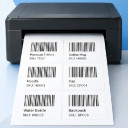
By Dmitry V. (CEO of "UKR Solution")
WooCommerce barcode generator for product and order labels & price tags. Easily print label with your printer (UPC, EAN, GS1, GTIN, QRcode).
CHOOSE WHAT YOUR WEBSITE NEEDS
Start with the task you need to solve. Compare features, WordPress and PHP requirements, update history and the author’s documentation. Test changes on a private copy and avoid adding several plugins for the same job.
This independent directory displays plugin information on WebFulHost and links to the official source. Packages are not mirrored or installed here. A plugin can include paid extensions or services with separate terms from its author.

