Clean, optimize and manage your database: revisions, spam, transients and leftovers. Edit options and meta, tune autoload, optimize tables.
★ 5.0/5 (3)100+ active installations
- Version
- 2.2.0
- WordPress
- 6.0+
- PHP
- 7.4+
- Updated
- 10 Oct 2026
View plugin details ↗Change your WordPress login URL, hide wp-admin, track failed login attempts, and fully customize your login page design for enhanced security.
30+ active installations
- Version
- 2.2.3
- WordPress
- 5.0+
- PHP
- 7.4+
- Updated
- 7 Sep 2026
View plugin details ↗Create beautiful, responsive data tables with advanced features like CSV import, sorting, filtering, pagination and extensive customization options.
80+ active installations
- Version
- 1.0.3
- WordPress
- 6.0+
- PHP
- 7.4+
- Updated
- 7 Feb 2026
View plugin details ↗KiviCare is an impressive clinic and patient management plugin (EHR).
★ 3.6/5 (23)1,000+ active installations
- Version
- 4.5.6
- WordPress
- 3.0.1+
- PHP
- 8.0+
- Updated
- 15 Oct 2026
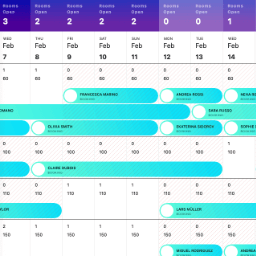
View plugin details ↗StayLodgic is a user-friendly property management system designed specifically for small to medium hotels, guesthouses, and vacation rentals.
★ 5.0/5 (1)10+ active installations
- Version
- 1.0.7
- PHP
- 7.4+
- Updated
- 5 Nov 2025
View plugin details ↗Drag & drop contact form builder and lead generation plugin. Build responsive contact forms, inquiry forms, feedback surveys & quote forms.
600+ active installations
- Version
- 1.3.3
- WordPress
- 5.6+
- PHP
- 7.4+
- Updated
- 28 Oct 2026
View plugin details ↗Plugin qui s'interface avec l'ERP de formation Formdev pour gérer la vente et l'inscription aux formations.
10+ active installations
- Version
- 2.1.5
- WordPress
- 6.8+
- PHP
- 7.4+
- Updated
- 18 Nov 2026
View plugin details ↗Free AI-powered image metadata generation for existing Media Library images using your own OpenAI or Gemini API key.
10+ active installations
- Version
- 2.0.5
- WordPress
- 5.0+
- PHP
- 7.2+
- Updated
- 6 Sep 2026
View plugin details ↗This plugin allows you to add the SMARTT Shipping features in your website.
10+ active installations
- Version
- 1.5.2
- WordPress
- 5.0+
- PHP
- 7.4+
- Updated
- 9 Nov 2026
View plugin details ↗Create searchable, sortable WordPress tables and charts from files, public snapshots, posts or databases.
0+ active installations
- Version
- 2.1.1
- WordPress
- 6.4+
- PHP
- 7.4+
- Updated
- 11 Nov 2026
View plugin details ↗Easily create, edit, and manage Gutenberg blocks without writing React
10+ active installations
- Version
- 2.0
- WordPress
- 6.8+
- PHP
- 8.0+
- Updated
- 8 Jun 2026
View plugin details ↗BruteFort - Rate Limit, Custom Login URL, Geo Blocking & IP Restriction for complete WordPress login security.
★ 5.0/5 (3)10+ active installations
- Version
- 0.0.8
- WordPress
- 5.0+
- PHP
- 7.4+
- Updated
- 28 May 2026
View plugin details ↗