CodePeople Post Map lets you geotag posts and seamlessly integrate your blog with Google Maps for a smooth, location-aware experience.
★ 4.2/5 (31)3,000+ active installations
- Version
- 1.3.1
- WordPress
- 3.0.5+
- Updated
- 19 Nov 2026
View plugin details ↗Create WooCommerce product tables that are searchable, sortable, filterable and mobile responsive. Help customers find and buy products much faster.
★ 4.9/5 (254)10,000+ active installations
- Version
- 5.7.8
- WordPress
- 6.0+
- PHP
- 7.4+
- Updated
- 2 Nov 2026
View plugin details ↗Simple Page Redirect is an easy-to-use WordPress plugin that lets you quickly redirect any post, page, or custom post type to an internal or external …
★ 5.0/5 (8)10,000+ active installations
- Version
- 1.8.1
- WordPress
- 3.0+
- PHP
- 5.0+
- Updated
- 6 Oct 2026
View plugin details ↗Duplicate post, post order, image resize, email via SMTP, admin menu editor, custom css / code, disable gutenberg and much more in a single plugin.
★ 5.0/5 (424)200,000+ active installations
- Version
- 9.4.0
- WordPress
- 4.6+
- PHP
- 5.6+
- Updated
- 23 Nov 2026
View plugin details ↗Create a list with an icon with this block plugin.
★ 3.7/5 (6)4,000+ active installations
- Version
- 1.2.10
- WordPress
- 6.5+
- PHP
- 7.4+
- Updated
- 17 Nov 2026
View plugin details ↗AJAX filter & WooCommerce product filter. Filter posts, CPTs & products by category, taxonomy, attribute & price. Build with drag & drop or AI (MCP).
★ 4.9/5 (159)6,000+ active installations
- Version
- 3.2
- WordPress
- 6.0+
- PHP
- 7.4+
- Updated
- 13 Nov 2026
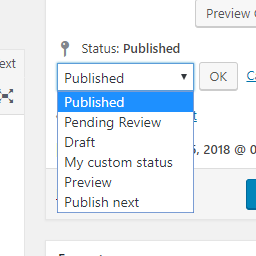
View plugin details ↗Add new statuses to all post types (posts, pages, products, ...).
★ 4.5/5 (11)1,000+ active installations
- Version
- 1.1.1
- WordPress
- 5.0+
- PHP
- 7.2+
- Updated
- 1 Sep 2026
View plugin details ↗Display a customizable list of custom post types with filtering options using the Custom Post List plugin.
★ 5.0/5 (1)30+ active installations
- Version
- 1.0.5
- WordPress
- 4.5+
- Updated
- 6 Jul 2026
View plugin details ↗Real-time SEO guidance, schema, and AI built in. Help search engines and AI systems understand your content. All AI tools included, no hidden fees.
★ 4.8/5 (27,821)10,000,000+ active installations
- Version
- 28.9
- WordPress
- 7.0+
- PHP
- 7.4+
- Updated
- 18 Nov 2026
View plugin details ↗A beautiful, easy to use post slider widget for Elementor to display your recent posts.
1,000+ active installations
- Version
- 2.2.1
- WordPress
- 6.0+
- PHP
- 7.4+
- Updated
- 4 Jul 2026
View plugin details ↗A simple plugin to build and display a staff listing for your website.
★ 4.6/5 (40)3,000+ active installations
- Version
- 2.2.6
- WordPress
- 3.5+
- PHP
- 5.4+
- Updated
- 3 Nov 2026
View plugin details ↗Intuitively reorder Posts, Pages, Custom Post Types, Taxonomies, and Sites with a simple drag-and-drop interface.
★ 4.4/5 (139)400,000+ active installations
- Version
- 3.2.0
- WordPress
- 3.5.0+
- Updated
- 16 Sep 2025
View plugin details ↗