

Курс валют ПриватБанка
By Maksym Marko
Plugin allows displaying PrivatBank exchange rates on a website using a Gutenberg block.
10+ active installations
- Version
- 2.1
- WordPress
- 6.0+
- Updated
- 15 Aug 2026
WORDPRESS RESOURCES
Explore public plugin information from the official WordPress.org directory. Compare what a plugin does, its requirements and update history before adding it to your website.
Explore WordPress hosting →14 matching plugins reported by WordPress.org · Page 1 of 2
Source: WordPress.org
Data refreshed 18 Nov 2026 23:46 UTC
By Maksym Marko
Plugin allows displaying PrivatBank exchange rates on a website using a Gutenberg block.
Pay in parts for WooCommerce: PrivatBank Payment in Parts, monobank Purchase in Parts and A-Bank in one payment method, with the monthly amount.
LiqPay payment gateway for WooCommerce: Visa, Mastercard, Privat24, Apple Pay and Google Pay on the LiqPay page, signed callback and test mode.

By Mykhailo Brych
Everything a Ukrainian WooCommerce store needs in one plugin: payments, Nova Poshta, Checkbox receipts and notifications. Turn on only what you use.

By Baza Developers
Accept LiqPay payments anywhere on your site — no shop or cart needed. Shortcode, block and Elementor widget, payment history, refunds, test mode.

By Vitalii Hura
Accept card, Apple Pay, Google Pay and Privat24 payments in WooCommerce through the LiqPay payment service.

By allidevelop
One-page checkout for Ukrainian WooCommerce stores: Nova Poshta and Ukrposhta at real rates, cash on delivery and Ukrainian online payments.

By Ihor Kit
Bank transfer by IBAN for WooCommerce: an NBU payment QR code, buttons that open Privat24 or monobank with the details filled in, copy buttons.

By falselight
Help visitors convert currencies and compare prices. Converters, tables, and badges, with 80+ data sources to choose from. No API key required.

By falselight
Easy-to-use, free currency converter. 🔑 No API key needed. ❤️ Install and enjoy.
By falselight
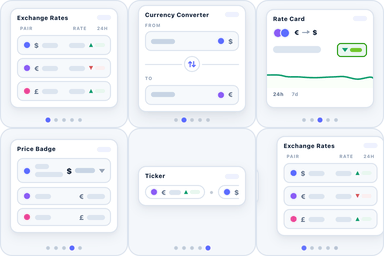
Free: ✨ 5 beautiful currency blocks — 📈 live rates, converter, ticker, card, price badge. 173 currencies, 🔌 15 sources, custom rates. No API key.

By CatCode
Show a payment QR code and Monobank or Privat24 buttons on the WooCommerce Thank You page, then auto-detect incoming payments via Monobank API.
CHOOSE WHAT YOUR WEBSITE NEEDS
Start with the task you need to solve. Compare features, WordPress and PHP requirements, update history and the author’s documentation. Test changes on a private copy and avoid adding several plugins for the same job.
This independent directory displays plugin information on WebFulHost and links to the official source. Packages are not mirrored or installed here. A plugin can include paid extensions or services with separate terms from its author.

