Display Server Info
By RobertWP
Displays server, PHP, and database info in the dashboard, admin bar, and footer, with shortcode and multilingual support.
★ 5.0/5 (1)100+ active installations
- Version
- 2.2.1
- WordPress
- 5.6+
- PHP
- 7.2+
- Updated
- 17 Nov 2026
WORDPRESS RESOURCES
Explore public plugin information from the official WordPress.org directory. Compare what a plugin does, its requirements and update history before adding it to your website.
Explore WordPress hosting →3,783 matching plugins reported by WordPress.org · Page 25 of 50
Source: WordPress.org
Data refreshed 21 Nov 2026 17:12 UTC
By RobertWP
Displays server, PHP, and database info in the dashboard, admin bar, and footer, with shortcode and multilingual support.

By FooPlugins
Migrate to FooGallery from other gallery plugins like NextGen, Modula, Envira and other gallery plugins.
By Ron Fredericks
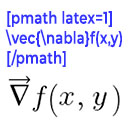
Render mathematical equations in WordPress as PNG images using pmath native syntax or LaTeX input with server-side rendering.

By Dits.Agency
Clean WordPress safely. Review what CleanFlow finds, understand why each item was selected, and stay in control before anything is deleted.

By jasonmad
Find leftover plugin options after uninstall. Complements — does not replace — full database optimizers.

By ikedajapan
A gentle automatic cleanup cat with safe expired-transient cleaning, optional old spam/revision cleanup, scheduled runs and clear results.
Demi is an all-in-one WordPress toolkit for demo imports, backups, restores, migrations, search & replace, and site resets.

By Never Settle
Clone, copy, and duplicate WordPress sites, single sites, and multisite subsites with NS Cloner, a fast WordPress site cloner and site duplicator.
Bulk generate multiple Pages using dynamic content.

By SpeedX
A lightweight, no-bloat WordPress database cleaner. Remove unwanted records manually, with clear statistics and no unnecessary features.

By UserElements
Export and import Ultimate Member users via CSV — filter who to include, map fields, preview results, and save presets.
Create a staging WordPress site from production (live site). Ideal for testing updates, version change or re-write. Sync back only the changes.
CHOOSE WHAT YOUR WEBSITE NEEDS
Start with the task you need to solve. Compare features, WordPress and PHP requirements, update history and the author’s documentation. Test changes on a private copy and avoid adding several plugins for the same job.
This independent directory displays plugin information on WebFulHost and links to the official source. Packages are not mirrored or installed here. A plugin can include paid extensions or services with separate terms from its author.