

Property Hive
By Property Hive
Building a property website? Property Hive has everything you need to get started, and so much more.
★ 4.9/5 (96)3,000+ active installations
- Version
- 2.4.0
- WordPress
- 5.6+
- Updated
- 23 Sep 2026
WORDPRESS RESOURCES
Explore public plugin information from the official WordPress.org directory. Compare what a plugin does, its requirements and update history before adding it to your website.
Explore WordPress hosting →5,077 matching plugins reported by WordPress.org · Page 45 of 50
Source: WordPress.org
Data refreshed 21 Nov 2026 19:53 UTC
By Property Hive
Building a property website? Property Hive has everything you need to get started, and so much more.

By J-C Berthon
Stop spam without CAPTCHAs. Proof-of-Work protection for your forms and logins. Open-source, self-hosted, privacy-first.

By devowl.io GmbH
Obtain GDPR (DSGVO/RGPD) and ePrivacy Directive (TDDDG/TTDSG, LOPD-GDD, DTA) compliant consents in your cookie banner. More than just a cookie notice!

By PluginizeLab
A plugin or theme developer can view metadata by this plugin easily.

By demonisblack
Allows you to add textual annotations to images by select a region of the image and then attach a textual description.

By Brainstorm Force
Build a community right inside WordPress. Discussion spaces, courses, member profiles, and a beautiful dashboard — no coding needed.

By hippooo
Hippoo helps you manage WooCommerce orders, inventory, and analytics from your mobile. Receive real-time notifications and control your store on the g …
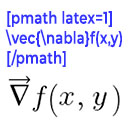
By Ron Fredericks
Render mathematical equations in WordPress as PNG images using pmath native syntax or LaTeX input with server-side rendering.

By Nilesh Pipaliya
Filter posts, then run powerful bulk actions from the list screen — with batch processing, operation history, and undo.
Optimize WordPress performance with server-level caching, Redis purging, and page speed tools for FlyWP-powered cloud servers.
OTP via SMS, Email/WhatsApp. WooCommerce SMS Notifications, Phone OTP Login, Passwordless Login, 10 Free SMS/Email Transactions, Custom SMS Gateway.

By Sean Mullins
Curate what your site tells machines: decide what is represented, arrange it visually, and see why every decision was made.
CHOOSE WHAT YOUR WEBSITE NEEDS
Start with the task you need to solve. Compare features, WordPress and PHP requirements, update history and the author’s documentation. Test changes on a private copy and avoid adding several plugins for the same job.
This independent directory displays plugin information on WebFulHost and links to the official source. Packages are not mirrored or installed here. A plugin can include paid extensions or services with separate terms from its author.

